SubGraphNode
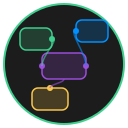
A nested graph container that holds its own internal set of nodes and edges. SubGraphNode displays an SVG preview of its contents and supports drill-down navigation, similar to Houdini HDAs or Unreal Engine Blueprint subgraphs.
Key Features
- Internal graph -- stores a complete graph (nodes, edges, canvas state) inside a single node
- SVG preview -- renders a miniature, color-accurate preview of the internal graph directly on the node face
- Drill-down navigation -- double-click to enter the subgraph and edit it as a full canvas
- Exposed attributes -- define input/output attributes that connect the internal graph to the parent graph
- Save/load -- subgraphs persist to their own JSON files at a configurable path
- Breadcrumb navigation -- the system tracks your depth so you can navigate back to the parent graph
Configuration Options
| Option | Type | Default | Description |
|---|---|---|---|
width | number | 300 | Width in pixels |
height | number | 200 | Height in pixels |
title | string | 'New SubGraph' | Display title in the title bar |
color | string | 'default' | Color theme variant |
subgraphId | string | Auto-generated UUID | Unique identifier for the subgraph data |
subgraphPath | string | 'subgraphs/{subgraphId}.json' | File path for persistent storage |
internalGraph | object | Empty graph | The internal graph data (nodes, edges, canvasState) |
exposedAttributes | object[] | [] | Attributes exposed to the parent graph |
Usage
Entering a SubGraph
Double-click the node body or the SVG preview to navigate into the subgraph. The canvas transitions to show only the internal graph. Double-clicking the title bar or handles does not trigger navigation.
Editing the Internal Graph
Once inside, the subgraph behaves like a full canvas. You can add nodes, create edges, and arrange content. Changes are tracked and the preview updates when you exit.
Exiting a SubGraph
Use the breadcrumb navigation to return to the parent graph. The SubGraphNode's preview SVG re-renders to reflect any changes you made inside.
Exposed Attributes
Exposed attributes let you pass data between the parent graph and the subgraph's internal graph. Each attribute has:
| Property | Type | Description |
|---|---|---|
id | string | Unique identifier |
name | string | Display name shown on the handle tooltip |
type | string | Data type of the attribute |
direction | string | 'input' or 'output' |
Input attributes appear as handles on the left side of the node. Output attributes appear on the right. Handle tooltips display the attribute name, direction, and type.
Preview Rendering
The SVG preview maps internal node colors to their visual counterparts and draws curved edges between them. An empty subgraph displays "Empty SubGraph" placeholder text. The preview auto-fits to the bounding box of all internal nodes with padding.
TIP
Use SubGraphNodes to encapsulate reusable logic. Build a pattern once inside a subgraph, expose the relevant inputs and outputs, then duplicate the SubGraphNode wherever you need that pattern.